Exploring Daily Routines on Seesaw
Caylie Gaccione
Curriculum Specialist
News
Seesaw is a platform that enables students, teachers, and parents/guardians to seamlessly work together. With Seesaw, teachers can post classwork, students can show their thinking process by adding media and annotations. With this, parents/guardians can see student work in the form of portfolios. This only scratches the surface of all of the amazing features that Seesaw has to offer.
It is also great for enhancing student engagement. Instead of just having students complete worksheets or assignments, they are motivated from the start through the use of uploaded content from the teacher, or pre-made content offered from the Seesaw Library! Within the library, there are tons of categories on different subjects, ranging from ELA to computer science. One of the categories that is incredibly helpful for teachers and students alike is Daily Routines. Keep reading to learn more about the benefits of exploring daily routines on Seesaw!
How do I access Daily Routines?
The Daily Routines category is not only easy to use, but is also easily accessible on Seesaw. Once you are logged in, select “Library,” which can be found next to “Messages” at the top of your Seesaw homepage. You will then be brought to the Seesaw Library where you will see a range of lesson topics and grade bands to filter by. Navigate to the Daily Routines icon to see a further variety of resources.
Once you click into the Daily Routines, you will again be able to search by standard or filter by grade band. You can then scroll through different categories: SEL Songs, Daily Feelings Check In, Calendar Math, Math Skills Games, and Checks for Understanding. Now, we are ready to dive in a little bit deeper to check out all of the options that are available in each section.
Lesson options
You are now ready to explore each lesson and choose the ones that best meet the needs of your students. Be sure to click into “View All Lessons” in each section to see the full scope of lessons that are available. Keep in mind that some of these will be free, while others require a paid subscription. If they are free, it will be indicated right at the top of the lesson. Click into a lesson and start exploring! Let’s take a closer look at what is included in each one:
Lesson Overview
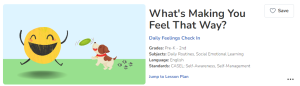
The top section will give an overview of what’s to come in the lesson. For example, you will find the grades, subjects, language, and standards listed here. You can also save the lesson to access for later use. The 3-dot menu is also where you can assign the activity or share the lesson.
Introduction & Practice
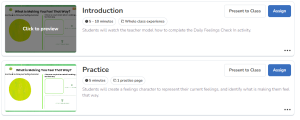
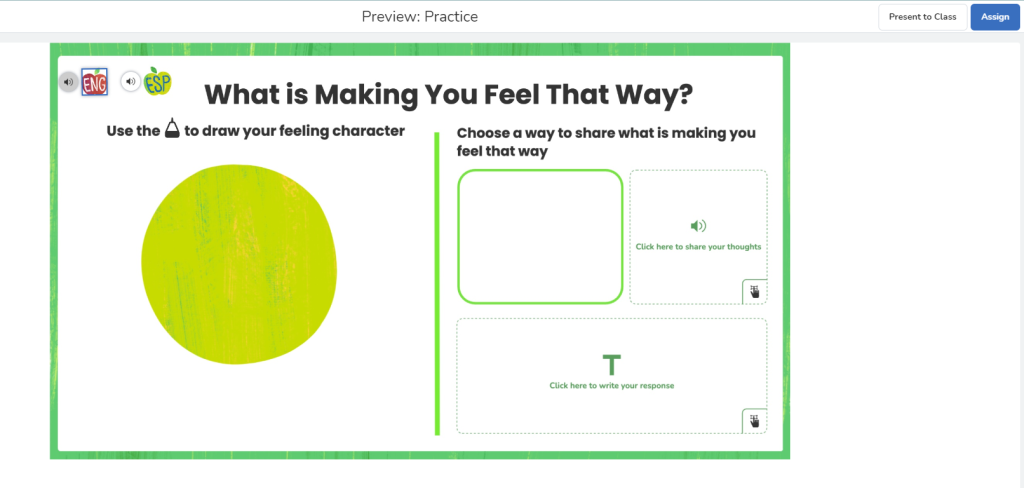
This next section is where you will see the suggested time to complete the activities as well as whether or not it is an independent or whole class experience. You can also present this section to the class or assign just this introductory piece to your students. By hovering over the image of the lesson, you can preview the assignment to see exactly what students will be able to see once it is shared with them. Another key feature is that by clicking the 3-dot menu, you can edit the activity to best meet the needs of your students. Consider adding multimedia instructions or examples, and adjusting the directions or name of the activity, etc.
Another amazing feature is that students can listen to the directions in English or Spanish. You can also present or assign to class from within “Preview.”
Lesson Plan
Within the Lesson Plan, you will find a summary of the lesson that includes the Objective, I Will Statement, and Standards. You will also notice “Supporting Resources” such as a lesson plan in Spanish. You will see “Teacher Tips” to guide your instruction as well as the” Instructional Format.” This indicates whether the lesson is a whole class, small group, independent practice, or partner-based activity. Finally, the “How to Teach”section will go over the Introduction and Practice sections in further detail.
Final features and tips
As you can see, there are a ton of amazing tools and features available through Seesaw Daily Routines. Let’s take a look at a few final features and tips:
- Implementation Resources: If you scroll down to the bottom of each section (i.e. Daily Feelings), you will see Implementation Resources. The first option is a video that will go over the Daily Routines and the second is the Teacher Implementation Guide. Keep in mind that not every section will have a video. Instead, there will be a Teacher Implementation Guide PDF that is specific to each section that includes best practices and checks for understanding.
- View an Example: When you preview an activity, you can also select “View an Example,” which is a great way to see what should be accomplished by the activity. You can even share this with students so they have a model.
- Multimodal Tools: Like all lessons in Seesaw, students (and teachers) can take advantage of the multimodal tools available to show their thinking. Choose from adding text, microphones, images, and drawing tools!
More on OTIS
I hope that you are excited to try out the Daily Routines on Seesaw. Consider using these routines to guide your instruction and even sprinkle these activities into your pre-existing lessons. Be sure to check out our Seesaw OTIS courses as well as many other courses in the OTIS Course Library.
For more tips, tricks, and tools for teaching in and out of the classroom, check out more content on the Teq Talk blog or our YouTube channels OTIS for educators and Tequipment.
We also offer virtual professional development, training, and support with OTIS for educators. Explore the technology and strategies that spark student success — no matter where teaching or learning are happening!
Follow us on social:
 edteq
edteq  OTIS4educators | Teq Products | iBlocks
  OTIS4educators | MyTeq
  Teq
Teq
0 thoughts on “Exploring Daily Routines on Seesaw”
Related Articles & Other Recommended Reading

Top 10 Ways to Celebrate Pi Day
Did you know that the first official Pi Day celebration occurred in 1988 at the Exploratorium in San Francisco? In America, we celebrate on March 14th because 3.14 are the first digits of the mathematical constant known as pi. However, in areas such as the United Kingdom, people celebrate on July 22nd. Why? This is […]

7 New PD Courses to Transform Your Classroom for February 2026
Get ready for Digital Learning Day on February 26th! Celebrate with 7 brand-new OTIS courses that make edtech integration easy. From AI-driven lesson planning to interactive classroom tools, master the tech your students love, without the steep learning curve. Here are 7 new PD courses to transform your classroom for February 2026! Check Out What’s […]

Check out our PD Micro-Credential: The Science of Reading
Earlier this year, OTIS for educators launched a PD micro-credential focused on “The Science of Reading.” This 10-part online course takes just under eight hours to complete. “The Science of Reading” micro-credential PD provides participants with a solid foundation of the tenets of reading instruction. We will delve into each component, critical for understanding the […]