Using AI To Create Quick Activities and Assessments with Conker.ai
Lindsey Merrow
Curriculum Specialist
News
Conker.ai can be added to the growing list of artificial intelligence tools that can help support teachers, especially if you are teaching in a Google district. Conker.AI is working on becoming a more robust tool. It doesn’t have too many bells and whistles so far. However, it is a really great and simple tool to get started with using artificial intelligence in the classroom! To use it, you will need to give the app permission to access your Google Drive, which has become a pretty standard practice with many websites and applications.
Qualms about AI
Conker is from Mote, a company that is widely used by educators for creating voice notes. That fact may help foster some trust with providing it access. They are also working on making it COPPA compliant, so while this is a great tool for creating activities, assessments, and allowing you some options in getting that content to students, I’d hold off on having them use the site directly until they’re compliant.
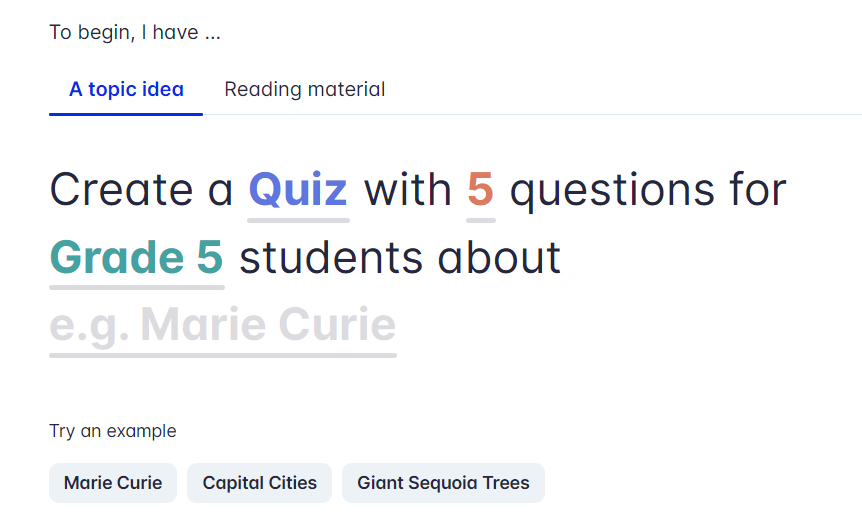
Despite my hesitancy on allowing students to use this, I was curious to see how well Conker would support classroom needs. Currently, Conker is a free tool that allows teachers to create quizzes, fill-in-the-blank activities, true/false questions, and more that can then be easily exported to a Google Form. When you first login, you will see a prompt like the one below:
How to get started
If you see something underlined in Conker.AI, that means it is something that can be edited. Click on the underlined items and a drop down menu will appear. So for example, the word “quiz” in the above image is clickable. If you click the word the dropdown will give you other options. So, rather than the default quiz, you can choose “Fill in the blank” or “Read & Respond.” Instead of a five question output, you can select anywhere from 5-10. You can also choose a grade range from kindergarten all the way up to higher education.
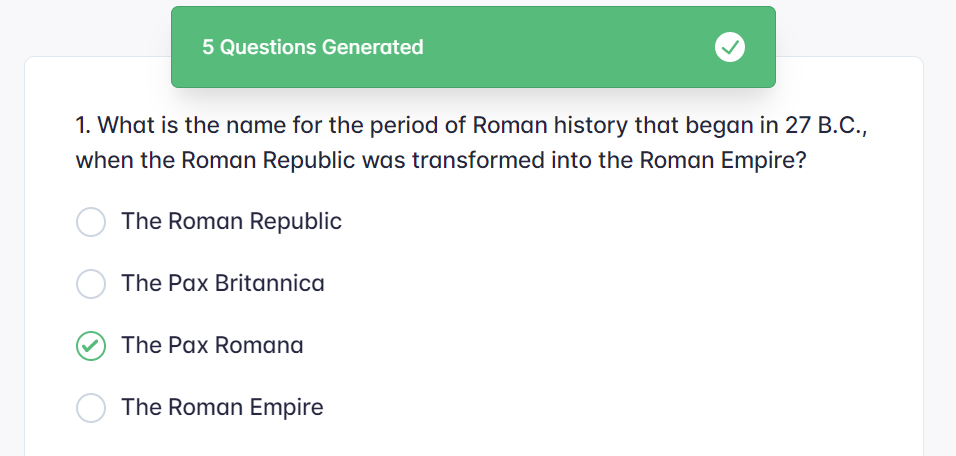
Next, you simply type in a topic and watch the magic happen, or you can copy and paste source material from the lesson you’re working on. Once the topic/material is placed, click on “generate” and watch as it creates a quick activity/assessment for your students! This is such a unique way to generate exit tickets, check ins, informal assessments, and more. Below is my generated quiz from a search for 8th grade questions on the Roman Empire.
This is such a helpful tool for those in Google districts. This is especially because it will offer you the ability to export it to a Google Form. Once in a Form, you will be able to gather results from students in your classroom. The advantage of being able to export this to a Google Form is that you can then easily assign it to students and even set up the Form as a graded quiz.
More from OTIS
Conker.AI is a great way to make quick, differentiated activities in your classroom by allowing you to change the type of question, grade level, and more. Additionally, by posting it with this tool, students can access their digital accessibility tools online, such as text-to-speech, to read them the questions. For more on AI and Google tools, check out our OTIS courses and keep your eyes on the blog!
For more tips, tricks, and tools for teaching in and out of the classroom, check out more content on the Teq Talk blog or our YouTube channels OTIS for educators and Tequipment.
We also offer virtual professional development, training, and support with OTIS for educators. Explore the technology and strategies that spark student success — no matter where teaching or learning are happening!
Follow us on social:
 edteq
edteq  OTIS4educators | Teq Products | iBlocks
  OTIS4educators | MyTeq
  Teq
Teq
0 thoughts on “Using AI To Create Quick Activities and Assessments with Conker.ai”
Related Articles & Other Recommended Reading

Top 10 Ways to Celebrate Pi Day
Did you know that the first official Pi Day celebration occurred in 1988 at the Exploratorium in San Francisco? In America, we celebrate on March 14th because 3.14 are the first digits of the mathematical constant known as pi. However, in areas such as the United Kingdom, people celebrate on July 22nd. Why? This is […]

7 New PD Courses to Transform Your Classroom for February 2026
Get ready for Digital Learning Day on February 26th! Celebrate with 7 brand-new OTIS courses that make edtech integration easy. From AI-driven lesson planning to interactive classroom tools, master the tech your students love, without the steep learning curve. Here are 7 new PD courses to transform your classroom for February 2026! Check Out What’s […]

Check out our PD Micro-Credential: The Science of Reading
Earlier this year, OTIS for educators launched a PD micro-credential focused on “The Science of Reading.” This 10-part online course takes just under eight hours to complete. “The Science of Reading” micro-credential PD provides participants with a solid foundation of the tenets of reading instruction. We will delve into each component, critical for understanding the […]